Static analysis
cts analyze checks the exported Structured Text (.st) of a sync folder. It
is offline: it reads project-view/ and never talks to the IDE or a PLC.
cts.exe runs it; no Python is needed.
From project to findings
- Set the open project's sync folder: Alt+Q,
8,1in CODESYS, orcts set-sync-folder. - Run
cts export; it writes every textual object as.stand every text list as.csv. - Run
cts analyze, or open quick window More,5Static analysis.
Basic usage
cts analyze --workspace C:\path\to\sync-folder
cts analyze --workspace C:\path\to\sync-folder --json
cts analyze --workspace C:\path\to\sync-folder --sarif findings.sarif
cts analyze --path "PLC/Plc Logic/Application/MAIN.st"
cts analyze --changed
cts analyze rules
cts analyze explain CTS0001
Only what CODESYS builds is analyzed: an object excluded from the build (the
IDE's Exclude from build property, ExcludeFromBuild on the file's
(* cds-text-sync: ... *) line) is left out with its members, and its code
does not count as a use of anything; the verdict says how many with
excluded=N.
Without --workspace it uses the sync folder around the current folder;
--project-view DIR analyses a view folder directly. --rule CTS0001 runs one
rule (repeatable), even one that is off by default. --path keeps the
findings of one file or folder of the view (repeatable; a path from the view or
from the current folder) while the rules still read the whole project, so a
variable used elsewhere is not reported unused. --changed keeps the findings
of the view files git sees changed since the last commit, new files included
(changed_files=N in the verdict): what an edit added, before it is committed.
A finding an edit causes in an unchanged file (a variable no longer read
anywhere) is left out, so run without it before the commit. --severity danger
keeps only the danger findings (suspicious: those and the suspicious ones),
without a settings file; the counts and the exit code follow what is kept. The last line counts the
findings by rule, most first. --json prints the
findings, diagnostics and summary; --sarif FILE also writes them as SARIF
2.1.0 for CI and code scanning.
Findings and policy
Rules are grouped into danger, suspicious and style, covering text,
declarations, data flow, control flow, types, pointers, strings, function
blocks and project structure. cts analyze explain ID shows a rule's
documentation.
A rule finding is not an analysis diagnostic: a run that could not read part of
the project is incomplete and never reported as clean. --fail-on and
--incomplete set the CI policy. Exit codes:
0— policy passed;1— unsuppressed findings meet the failure threshold;2— the analysis cannot start (settings, folder);3— incomplete analysis with--incomplete error.
Settings
Settings live in the sync folder's cds-text-sync.json, under "analyze":
{
  "analyze": {
    "fail_on": "suspicious",
    "incomplete": "warn",
    "rules": {"CTS0004": {"enabled": true, "severity": "danger", "options": {"min_occurrences": 2}}},
    "scopes": [{"path": "POUs/Generated/**", "enabled": false}, {"path": "POUs/**", "exclude": ["CTS0004"]}]
  }
}
A source file opts out of rules with a comment that gives the reason:
// cts:ignore-file CTS0001 -- generated code.
Baseline and triage
State lives in .cts-analyze/ beside project-view/: baseline.json,
suppressions.json and session.json.
cts analyze baseline create    # accept today's findings
cts analyze baseline check     # findings not in the baseline, stale entries
cts analyze triage --apply decisions.json
decisions.json is a list of {"fingerprint", "action": "suppress|fix-later|baseline",
"reason", "note"}; a suppression needs a reason, and every decision must match
a finding of the run, or nothing is written.
The findings window
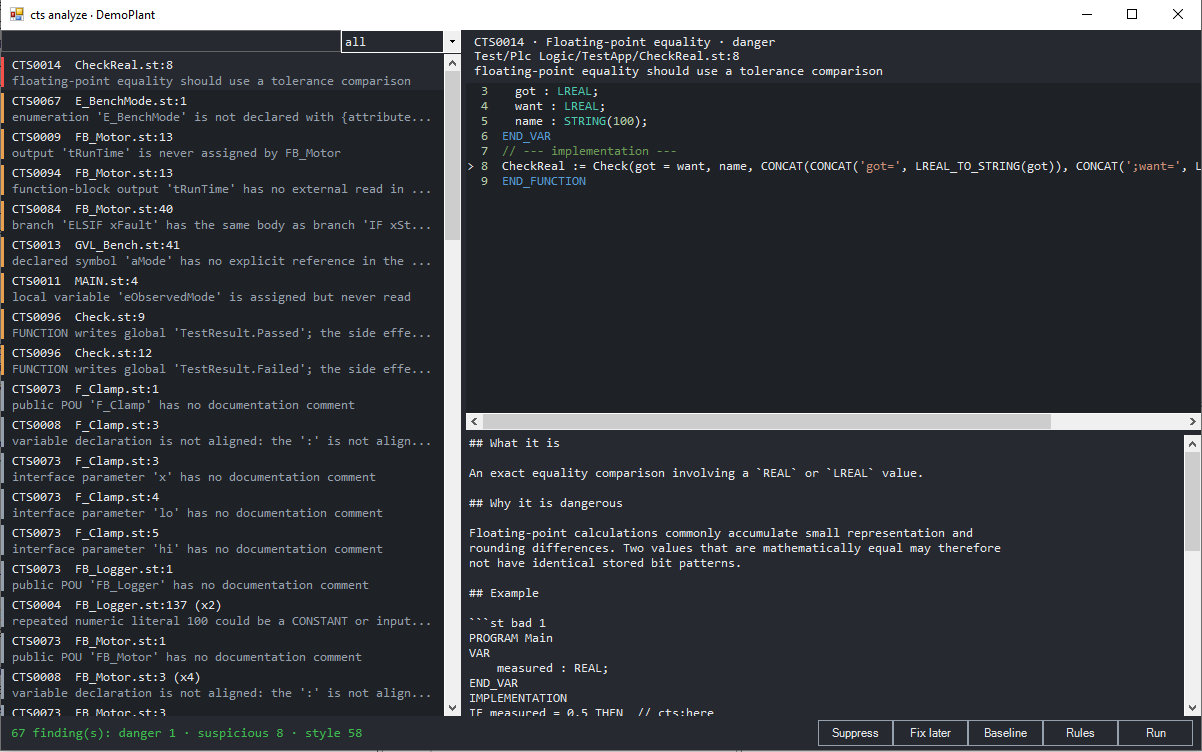
Quick window More, 5 opens the findings window for the open project's sync
folder. It lists the findings, the most severe first, filtered by severity or
text; the one chosen shows its lines of the file, marked, and its rule's
documentation. Suppress (with a reason), Fix later and Baseline file the
selected findings (cts analyze triage); Rules lists the catalog, and Enter
switches a rule on or off for the sync folder
(cts analyze rules --enable|--disable ID). F5 runs the analysis again;
Ctrl+C copies the selected findings. The analysis reads the .st files on
disk: export first to analyse the IDE's latest edits.
Compiled visualization XML is checked separately.